Your child spends hours on websites and one day asks how someone actually makes one. That’s a great place to start. Web development is one of the friendliest ways into real coding, because children see the result in a browser the moment they save. This guide explains it in plain English, covers the right age to start and free tools, and walks you through a first webpage you can build together in 30 minutes.
Quick answer: web development means building websites and web apps with three languages: HTML for the structure, CSS for the style and JavaScript for the behaviour (what happens when you click). Most children are ready to type HTML and CSS from about 10; younger children do better learning the same logic with block coding. A first page costs nothing; a course takes children further, into JavaScript, apps and publishing real sites.
What is web development?
Web development is building the websites and web apps we use every day, from a school’s homepage to an online game. It has two sides:
- Front end: everything you see and click in the browser. Children start here, because results show up straight away.
- Back end: the hidden part on a server that stores information, such as logins or a game’s high scores.
Web design is mainly about how a site looks and how easy it is to use, and children learning web development get a taste of both. If coding itself is new to you, start with our guide to what coding is and why it matters for kids.
How to explain web development to a child
Here’s an analogy most children get straight away, and it answers a common homework question: how would you explain web development to a middle-school sibling? A website is like a house:
| Language | Its job | In the house | Example |
|---|---|---|---|
| HTML | Structure | The walls, rooms and doors | <h1> makes a big heading |
| CSS | Style | The paint, furniture and decorations | color: purple; turns text purple |
| JavaScript | Behaviour | The light switches and the doorbell | A button that pops up a message |
In one sentence: HTML says what’s on the page, CSS says how it looks, and JavaScript says what it does.
To see it for real, right-click any page in Chrome, Edge or Firefox on a home computer and choose Inspect. The page’s HTML appears, and children can even change the words on their own screen. Nobody else sees the change, and a refresh puts everything back. (School-managed laptops sometimes block this tool.)
What age can kids start web development?
There’s no strict rule, but typing is the real starting line: one missing bracket or semicolon and the page looks wrong. That’s why most children are ready from about 10, while younger ones learn the same logic more happily with blocks.
| Age | What to try | Good tools |
|---|---|---|
| 5–7 | Picture-block coding: sequences, loops, simple stories | ScratchJr, Bloqi |
| 7–9 | Games and animations with blocks; a peek at a page with Inspect | Scratch, Bloqi |
| 10–12 | First webpages in HTML and CSS | A text editor, an online editor, Khan Academy |
| 12+ | JavaScript, then tools such as React | Online editors, VS Code |
How to tell they’re ready: they can type without hunting for every key, they can follow steps written on a page, and one mistake doesn’t make them quit. Younger children can start with block coding or Scratch, and our guide to what age kids should start coding covers every age.
“One thing I’ve learnt is that children are far more capable than we sometimes give them credit for. You just need to give them the opportunity to try.”
— Hannan Moti, Founder and CEO, iCodejr
Build a first webpage in 30 minutes
You don’t need to buy anything. Sit together, take turns at the keyboard and follow these steps:
- Open an editor. On Windows, use Notepad. On a Mac or Chromebook, a free online editor such as CodePen is simplest, and it shows the page as you type.
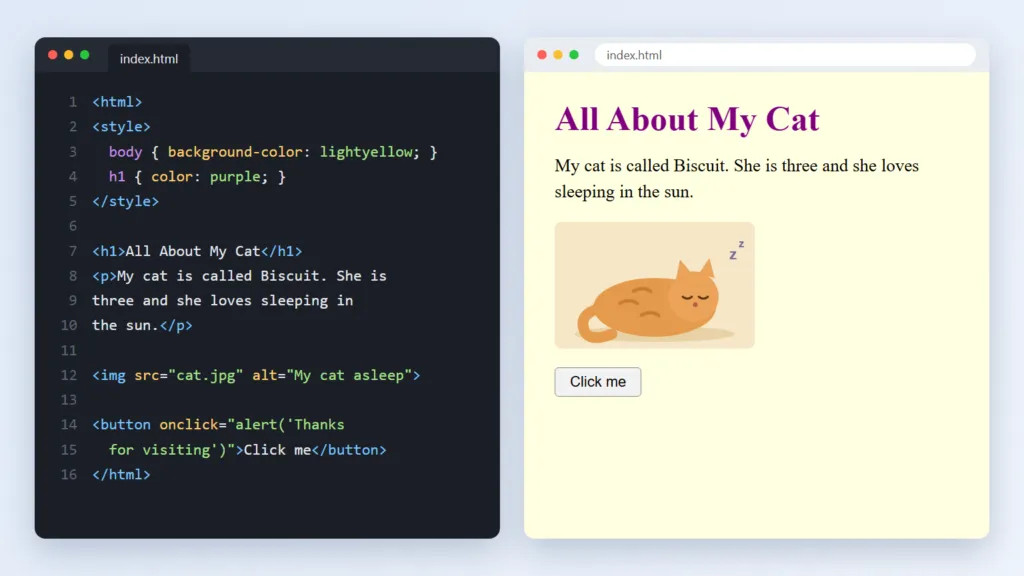
- Add a heading. Type
<h1>All About My Cat</h1>(or a heading about their favourite team or hobby). The first tag opens the heading; the one with the slash closes it. - Add some text. Write two or three sentences between
<p>and</p>to make a paragraph. - Save and open it. In Notepad, save the file as
index.htmlwith “Save as type” set to “All files”, then double-click it. It opens in your browser as a real webpage. - Add a picture. Put a photo in the same folder and type
<img src="cat.jpg" alt="My cat asleep">, using the photo’s real file name. - Add colour with CSS. At the top, type
<style> body { background-color: lightyellow; } h1 { color: purple; } </style>, then save and refresh. Code uses the American spelling “color”, so “colour” won’t work. - Add a button with JavaScript. Type
<button onclick="alert('Thanks for visiting')">Click me</button>, then save, refresh and click it.
If something doesn’t appear, look for a missing bracket or closing tag. Fixing that kind of mistake is called debugging, and real developers do it every day.
Want a teacher to take it further?
Try a free one-to-one lesson with a teacher, online. We start where your child is, whether that's their first HTML tag or their first JavaScript button, and you can watch part of it.
Free web development tools for kids
Children can learn a lot of web development for free:
- A browser and a text editor: already on your computer.
- CodePen: a free online editor with HTML, CSS and JavaScript side by side and a live preview.
- Khan Academy: free step-by-step lessons on HTML, CSS and JavaScript.
- VS Code: the free code editor many professional developers use, for older children’s bigger projects.
- MDN Web Docs: Mozilla’s free reference, for looking up any HTML tag or CSS rule.
Check the age limits: many online editors and hosting sites are for users aged 13 and over, so keep accounts under a parent’s email. Our guide to learning coding at home has a weekly plan to keep it going.
What can kids build with web development?
Children work hardest on projects they care about: a page about their pet or football team, a birthday invitation, a portfolio of their drawings or Scratch games, or a quiz with buttons that say “correct” or “try again”.
In our web development course, students go further: a personal webpage, a contact form, a card-style gallery, an animated landing page and a full responsive portfolio website, then JavaScript apps, a QR code generator and React applications. If your child prefers phone apps or games, see our guides to app development for kids and game development classes.
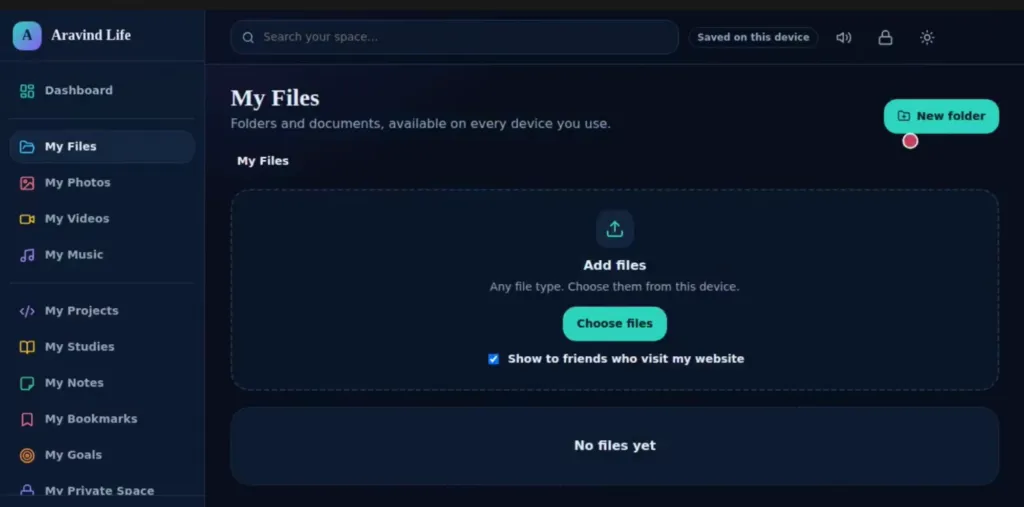
From our classes: for a first website, Aravind, 13, built “Aravind Life”, a personal site with its own dashboard and pages for files, photos, videos, music, projects, studies, notes and goals, plus a tick box to choose what friends who visit can see.
Does learning web development early give kids an edge?
It can, though not in the “future tech millionaire” way some adverts suggest. Here’s what it honestly builds:
- Quick, visible results that keep children motivated.
- A gentle step to typed code: HTML and CSS bridge the gap from blocks to typing, and JavaScript is a full programming language.
- Creativity and logic together: choosing colours and layouts, then making the code behave.
- A sharper eye online: once children know how pages are built, they ask who made a site and why.
- Something to show: a portfolio site to share with family now, and with schools later.
What about AI? AI tools can now produce a simple webpage from a description. That makes understanding the code more useful, not less: children who know HTML, CSS and JavaScript can check, fix and change what AI gives them. Our guide to prompt engineering for kids covers using AI tools well.
“It’s nice to see my child learning something that feels relevant to the world they’re growing up in, and enjoying it at the same time.”
— Daniel F., parent of Noah
Keeping your child safe when they publish online
Building a site on your own computer is private. Publishing it for anyone to see needs a few family rules:
- No personal details: no full name, school, address, or photos that show where they live or study. Use a nickname or first name only.
- A parent’s account for any hosting or editor sign-ups.
- Care with contact forms and comments on public pages; send any form messages to a parent’s email.
- Their own pictures, or ones clearly marked free to use.
If you’re not technical yourself, our guide to coding for non-tech parents has more ways to help without knowing the code.
How our web development course works
Our web development course for ages 10 to 18 takes children from their first HTML tag to React applications in 48 sessions:
- Module 1, HTML and CSS (24 sessions, best for about 10–17): page structure, styling, Flexbox layouts and Bootstrap.
- Module 2, JavaScript and React (24 sessions, from about 12): interactivity, designing for users, React and an introduction to Node.js.
Children complete 16+ projects, get a certificate for each module and publish their work online, so they have real links to share. Older students who enjoy a challenge can also enter Code Battle, our free yearly inter-school hackathon; see our guide to hackathons in the UAE.
Classes are live, online and one-to-one: 50 minutes each, in English or Arabic, with the same teacher every week. Your child needs a laptop or desktop (Windows, Mac or Chromebook). The first lesson is free; after that, packages cost from AED 60 a class plus VAT, and the credits work on any of our courses if your child later wants to try Python or AI.
Ask about this season's offer before you choose
We run offers several times a year, including in winter and summer, so you may pay less than the prices above. Message us and we'll tell you what's on right now.
Frequently asked questions
What is web development for kids?
It’s learning to build websites with HTML for structure, CSS for style and JavaScript for behaviour, usually starting with a simple page about a hobby.
How would you explain web development to a middle school sibling?
Compare a website to a house: HTML builds the walls and rooms, CSS paints and decorates them, and JavaScript wires up the lights and doorbell.
What age should kids start learning web development?
Most children can type HTML and CSS from about 10, and JavaScript from about 12. Younger children can learn the same logic with block coding.
Can kids learn web development for free?
Yes. A browser and a text editor are enough for a first page, and free tools such as CodePen and Khan Academy take them further.
Is HTML a programming language?
Not quite. HTML is a markup language that labels each part of a page. JavaScript is the web’s programming language, so children usually learn it after HTML and CSS.
How long does it take a child to learn to build websites?
A first page takes about 30 minutes. Getting comfortable with HTML and CSS takes a few months of regular practice, and JavaScript takes longer; our course covers both in 48 sessions.
Should my child learn Python or web development first?
Either works from about 10. Web development gives quick, visual results, while Python is used for games, data and AI; see our guide to Python for kids.
Is it safe for kids to publish a website?
Yes, with a few rules: no personal details or identifying photos, a parent’s account for sign-ups, and care with contact forms.
Do you offer web development classes for kids?
Yes. Our web development course is for ages 10 to 18, live and one-to-one online, over 48 sessions. The first lesson is free.
Ready to build a first website? Book a free first lesson, or see our web development course.