Your child keeps asking how games are made, and you’d like to see whether coding is really their thing before you pay for classes. Good news: they can start at home this week, for free, and you don’t need to know any coding yourself. This guide walks you through it step by step: the right free tool for your child’s age, a simple 4-week plan, how to help without knowing the answers, the best free coding websites and apps, and how to tell when a teacher would help.
Quick answer: to learn coding at home, pick a free tool that suits your child’s age (ScratchJr on a tablet for 5–7, Scratch in a browser from about 7, Python from about 10), set aside two or three short sessions a week, and build one small project at a time, such as an animated card or a simple game. Parents don’t need coding knowledge: ask questions, let your child fix their own mistakes, and celebrate finished projects. If they get stuck often or lose interest after a few weeks, a teacher can help.
Step 1: Pick the right free tool for their age
The most common mistake is starting with a tool that’s too hard or too young for the child. Here are the best free coding websites and apps by age:
| Age | Tool | Device | Why it works |
|---|---|---|---|
| 5–7 | ScratchJr | Tablet (free app) | Picture blocks, almost no reading; children make animated stories and simple games |
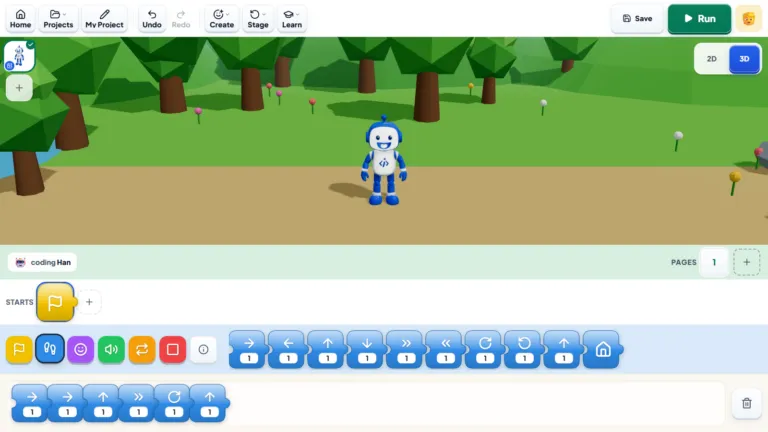
| 5+ | Bloqi | Browser | Our own free block-coding space for younger children to code, create and play; includes a kid-safe AI sandbox |
| 6–12 | Code.org | Browser or tablet | Short guided puzzles and courses, great for practising little and often |
| 7–12 | Scratch | Browser (free, made by MIT) | The best free tool for making games, animations and quizzes |
| 8+ | Microsoft MakeCode | Browser | Simple games with blocks, or programming a micro:bit if you have one |
| 8–14 | Minecraft Education | Computer | Coding inside Minecraft with blocks or Python; needs a licence, which some schools provide |
| 10+ | Python | Laptop or desktop | Free, real typed code; start with simple text games, then move to graphics with the built-in Turtle module |
| 11+ | Khan Academy | Browser | Free drawing and animation lessons in JavaScript, with videos |
If you’re not sure where your child fits, our guide to what age kids should start coding goes through each age, and our block coding guide explains why most children start with blocks.
Step 2: Set up a coding corner
You don’t need much:
- A laptop or desktop for Scratch, Python and most websites. A tablet is fine for ScratchJr; a phone is too small for real projects.
- A regular spot at a desk or the dining table, not the sofa.
- Headphones, so sounds and videos don’t take over the house.
- A fixed time: the same two or three slots each week, like after homework on Monday and Wednesday plus a longer Saturday session.
Step 3: Start with a project, not a course
Children stay motivated when they’re making something they care about. Instead of working through lessons in order, start with one small project and learn what you need along the way:
- Ages 5–7: an animated birthday card, or a story where their favourite animal walks across the screen and says hello.
- Ages 7–10: a “catch the apple” game with a score, a quiz about their favourite football team, or a simple maze.
- Ages 10+: a number-guessing game in Python, a Scratch platformer with levels, or a story that changes with the player’s choices.
“Kids have the funniest ideas for games sometimes. I love it when they surprise me with something I wouldn’t have thought of myself.”
— Eloisa M, iCodejr teacher
Step 4: Follow a simple 4-week plan
Two or three sessions a week is plenty: about 20 to 30 minutes for children under 8 and 30 to 45 minutes for older ones. Little and often works better than one long session at the weekend.
| Week | Focus | What it looks like at home |
|---|---|---|
| 1 | Getting comfortable | Clicking around the tool, one short beginner tutorial, a character that moves on screen |
| 2 | A first small project | One tiny animation or game, built all the way to the end, however simple |
| 3 | Their own twist | New sounds, a score counter, an extra level or characters they drew themselves |
| 4 | Polish and show off | Tracking down the last bugs, then a demo for the family or a friend |
By the end of the month you’ll have real answers: whether your child enjoys it, whether they can work on their own, and which tool suits them.
Step 5: Help without knowing the answers
You don’t need to understand the code to be a great coding parent:
- Ask, don’t fix. “What did you want it to do? What is it doing instead?” Explaining the problem out loud often solves it.
- Let them get stuck for a bit. Working out why something doesn’t work is called debugging, and it’s the most valuable skill in coding.
- Celebrate finished projects, not hours spent. A small finished game beats a big unfinished one.
- Be their first player. Play their game and tell them what was fun and what was confusing.
“My son is always talking about what he did in coding class. Half the time I don’t understand everything he’s explaining, but I love how excited he gets!”
— Ahmed E., parent of Youssef, Dubai
Step 6: Use free help when they're stuck
- Video tutorials: our YouTube playlist How to Make Games in Scratch walks through complete games, such as Fish Chaser and a maths quiz, step by step.
- Remixing: in Scratch, children can open other people’s projects, see the code and change it. It’s a great way to learn, as long as they add their own ideas.
- Our guides: Scratch for kids for first games, and Python for kids when they’re ready for typed code.
If your child shares projects online, look at the projects and comments together now and then, so you know what they’re seeing.
Is it working? Signs to watch
Good signs: they ask to code, they explain what they built without being asked, they fix their own bugs, and they start new projects on their own.
Signs they need more support: they keep starting projects and never finish one, they get frustrated and give up at the first error, they only copy tutorials without changing anything, or they’ve stayed at the same level for a month.
Neither list means coding isn’t for them. It usually means the tool or the project needs to change, or that a teacher would help. And if you’re worried about screen time, our article on screen time vs smart time explains why building something is different from watching.
Want a teacher's view on how your child is doing?
Book a free one-to-one lesson, live online. A teacher picks up where your child is, whether that's their first Scratch game or their first Python program, and you can watch part of it.
When to get a teacher
Learning at home on your own works well for many children, especially at the start. A teacher helps when your child keeps getting stuck, is ready for typed code like Python, or simply learns better with someone guiding them.
- Live online, one-to-one: your child keeps learning at home, with a teacher who joins by video, in English or Arabic. The first lesson is free; after that, classes start at AED 60 each plus VAT. See are online coding classes good for kids?
- A teacher at your home (Dubai only): our VIP At-Home programme brings a senior instructor to your home in Dubai, from AED 250 an hour, with monthly parent-teacher meetings. Places are limited to 100 students a year.
Our guide to choosing a coding or AI tutor at home in Dubai compares the two in more detail.
Live in Dubai and want a teacher at home?
iCodejr VIP brings a senior instructor to your home for coding, AI or robotics, with monthly parent-teacher meetings and 100% student satisfaction. Places are limited to 100 students a year.
If you go for online classes, ask about our seasonal offers before you choose a package.
Ask about this season's offer before you choose
We run offers several times a year, including in winter and summer. Before you choose a package, message us and we'll tell you what's on right now.
Frequently asked questions
Can kids learn coding at home for free?
Yes. ScratchJr, Scratch, Code.org, Bloqi, MakeCode, Python and Khan Academy are all free, and they’re enough to learn the basics and build real projects.
Can I teach my child coding if I don’t know how to code?
You don’t need to teach the code. Pick a free tool for their age, set regular short sessions, ask questions about what they’re building and celebrate finished projects. The tools and tutorials do the teaching.
At what age can children start coding at home?
Five is a good age to begin, using ScratchJr on a tablet. From about 7, most children can use Scratch on a computer, and from about 10 they can try Python.
How many hours a week should kids code at home?
Two or three sessions a week is plenty: about 20 to 30 minutes each for children under 8, and 30 to 45 minutes for older children.
What are the best free coding websites for kids?
Scratch for games and animations, Code.org for short guided lessons, Bloqi for younger children, and Khan Academy for older children who want to try JavaScript.
Can kids learn coding on a tablet or phone?
A tablet works well for ScratchJr and some Code.org lessons. For Scratch, Python and bigger projects, a laptop or desktop is much better. A phone is too small for real projects.
Scratch or Python: which should come first?
Scratch, for most children: the blocks take typing mistakes out of the way so they can focus on the logic. Python makes sense from about 10, once they’re comfortable with the ideas and type confidently.
How can I tell my child is making progress?
They finish projects, explain how they work, fix their own mistakes and start new ideas without being asked.
When should we get a coding teacher?
When your child keeps getting stuck, stops finishing projects, or is ready for typed code. A teacher keeps them moving and builds on what they’ve learned at home.
Do you have coding teachers who come to the home in Dubai?
Yes. Our VIP At-Home programme brings a senior instructor to your home in Dubai. It’s available in Dubai only, and you can apply here.
Want a hand getting started? Book a free first lesson, or see our Scratch and Python courses.