If your child would happily spend the whole weekend on Roblox or Minecraft, you’ve probably wondered whether all that gaming could turn into something more useful. It can. The same child who plays games for hours can learn to make them, and that’s one of the most natural ways into coding there is. This guide explains what game development for kids involves, which tools suit each age, a first game your child can build at home this week, and what to look for in game development classes in Abu Dhabi, Dubai and the rest of the UAE.
Quick answer: game development for kids means designing, coding and testing their own games, usually starting with block-based tools and moving on to typed code. Children can start at about 5 with ScratchJr on a tablet, make proper games in Scratch from about 7, build 3D games in Roblox Studio from about 10, and write games in Python from about 11. The main tools are free. Classes in Abu Dhabi and Dubai run both in centres and online; at iCodejr they’re live, online and one-to-one, so your child can join from anywhere in the UAE.
What is game development for kids?
Making a game involves four jobs, and children do all of them:
- Designing: deciding what the game is about, what the player does, and how you win or lose.
- Creating the look and sound: drawing characters and backgrounds, choosing music and sound effects.
- Coding: writing the rules that make it work, such as “when the player touches a coin, add 1 to the score”.
- Testing and fixing: playing it, finding what’s broken or too hard, and changing it.
That last job is where a lot of the learning happens. A game that’s too easy is boring, and one that crashes is frustrating, so children keep adjusting until it feels right. Game development classes teach children how to make games, not how to play them, so they’re quite different from a “gaming school”.
What age can kids start game development?
There’s a tool for almost every age. Here’s how children usually progress, with real games they build in our own courses:
| Age | Tool | What they make | iCodejr course |
|---|---|---|---|
| 5–7 | ScratchJr (tablet) | A maze game with obstacles, a space adventure, their own quest game | ScratchJr |
| 6–11 | Scratch | Two-player Pong, a ball shooter, a side-scrolling game with jumps | Scratch Level 1 |
| 8–12 | Scratch (advanced) | A basketball shooter, arcade games with timers and scores, a game that uses AI image recognition | Scratch Level 2 |
| 8–14 | Minecraft Education | A maze that’s different every time it runs, games with gravity and physics | Minecraft |
| 10–18 | Roblox Studio (Lua) | An obby, an adventure quest with an inventory, multiplayer games they can publish | Roblox |
| 10–17 | Python | A number-guessing game, Hangman, a two-player arcade game | Python |
Children don’t have to follow every step. A 10-year-old who has never coded can start straight in Roblox Studio or Scratch, depending on what excites them more. For a fuller age-by-age picture, see what age kids should start coding.
“The fun part is when kids realise they can make their own Roblox game instead of just playing someone else’s. That’s usually when they start asking a lot more questions.”
— Seif T, iCodejr teacher
The best free game-making tools for kids
You don’t need to buy anything to start. These are the tools most children use:
- ScratchJr and Scratch: free, made by MIT, and the easiest way to start. ScratchJr is an app for 5–7; Scratch runs in a web browser. See our Scratch guide for first projects.
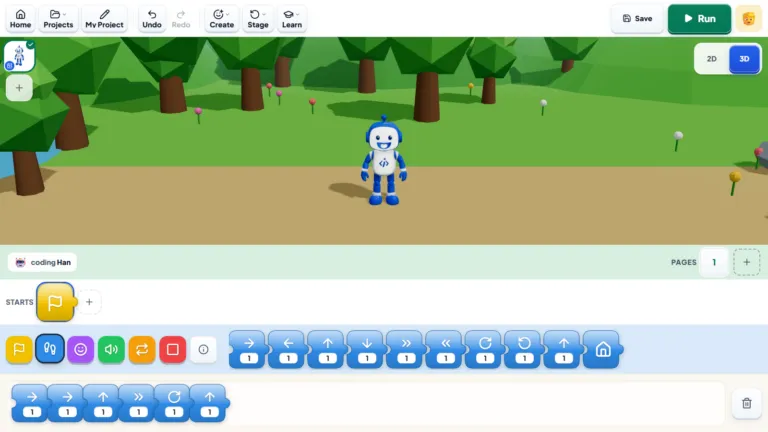
- Bloqi: our own free block-coding space, where children can code, create and play in the browser.
- Roblox Studio: free to download. Children build 3D worlds and code them in Lua. Set up their Roblox account with parental controls first; our Roblox guide explains how it works.
- Minecraft Education: coding inside Minecraft with blocks or Python. It needs a licence, which some schools provide.
- Python: free. Its built-in Turtle module is enough for simple games, and the free Pygame library adds more. Our Python for kids guide covers the first steps.
- Unity and Godot (for teens): engines that real game studios use. Both can be used free, and they suit teenagers who already know some typed code.
The “best” app is the one that fits your child’s age and the games they love. A Minecraft fan will stay motivated in Minecraft Education; a child who loves obbies will want Roblox Studio.
What kids learn from making games
Game development looks like play, but there’s a lot of real learning inside it:
- Logic and maths: moving a character means using x and y coordinates; keeping score means using a variable; making enemies appear in random places means using random numbers.
- Problem-solving: when the jump doesn’t work, children have to work out why. This is called debugging, and it’s the skill teachers value most.
- Design and storytelling: deciding what makes a game fun, fair and worth playing again.
- Persistence: most games need several tries before they work. Children learn to keep going instead of giving up.
- Something to show: finished games make a portfolio they can share with family, enter in a hackathon, or build on later.
If you’re worried about screen time, there’s a big difference between an hour of watching videos and an hour spent building something of their own. Our article on screen time vs smart time looks at this in more detail.
Try it at home: a first game in 30 minutes
You don’t need any coding experience for this. Open Scratch in a browser, click Create, and build a simple “catch the apple” game together:
- Add a bowl: choose the Bowl sprite. Give it the blocks
when green flag clicked,forever, and inside that,set x to (mouse x). Now the bowl follows the mouse. - Add an apple: choose the Apple sprite. Start it with
go to x: (pick random -220 to 220) y: 180, so it appears at the top in a random spot. - Make it fall: inside a
foreverloop, addchange y by -5. - Catch it: make a variable called score. Add
if touching Bowl then,change score by 1, and send the apple back to the top. - Make it harder: if the apple reaches the bottom, send it back too, or speed up the fall as the score rises. Let your child decide.
That’s a complete game, and your child will already be using loops, conditions, variables and random numbers. If they want more, our YouTube playlist How to Make Games in Scratch walks through more games, such as Fish Chaser, step by step.
Want to see your child make a real game?
Book a free one-to-one lesson with an iCodejr teacher, live online. Your child starts building a game in Scratch, Roblox or Python, depending on their age, and you're welcome to watch part of it.
How to choose game development classes in Abu Dhabi and Dubai
There are good options in both cities, from centres and after-school clubs to online classes. Whichever you look at, these questions help:
- Will my child finish real games? Ask to see games students have made. Copying a tutorial is not the same as building their own game.
- Is there a path from blocks to typed code? A good course moves children from Scratch to Roblox or Python when they’re ready, rather than keeping them on one tool.
- Does the teacher explain why the code works? That’s what lets children build their own ideas later.
- How much one-to-one time does my child get? In a group, quieter children can fall behind; one-to-one lets the teacher go at your child’s pace.
- Does the schedule fit your week? In Abu Dhabi and Dubai, travel time matters. Online classes save the drive, while centres suit children who love working in a group.
- Is there a free trial? One lesson tells you more than any brochure.
Game development classes at iCodejr
Our game development classes are live, online and one-to-one, in English or Arabic, so the teacher works at your child’s pace. Children in Abu Dhabi, Dubai, Sharjah, Al Ain and the rest of the UAE all join the same way, and classes are 50 minutes for ages 7 and up.
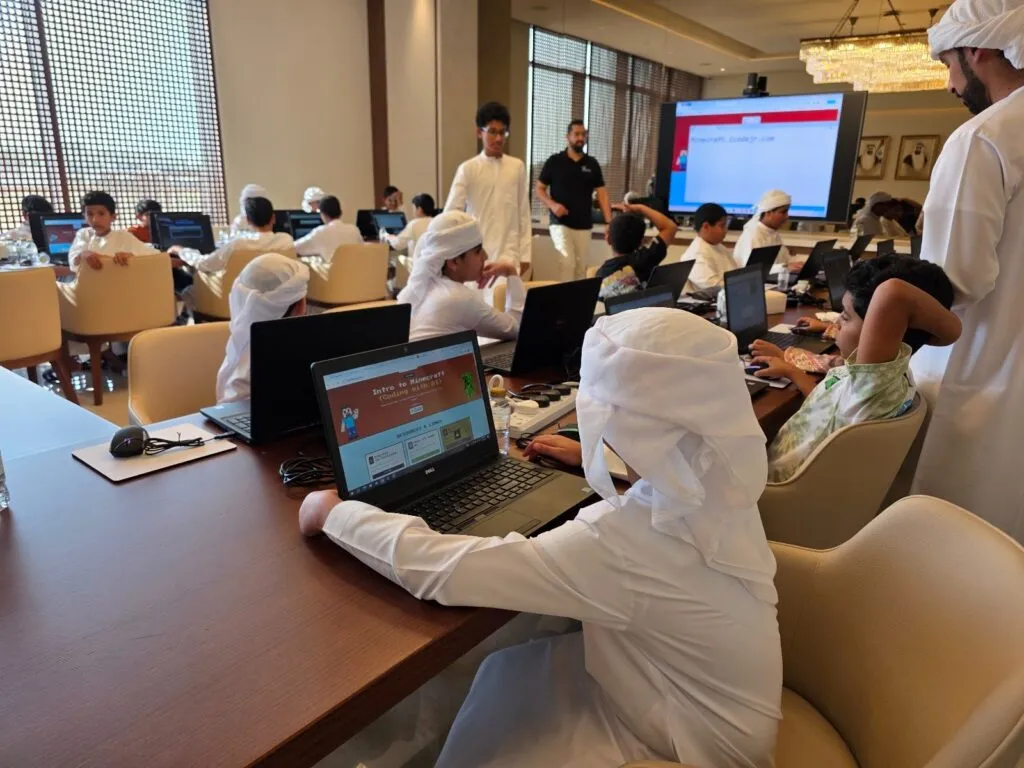
We teach game-making in person too: in July and August 2026 we ran Minecraft coding workshops for the Abu Dhabi Gaming Council, with rooms full of young Abu Dhabi coders building in Minecraft Education.
- Ages 5–7: ScratchJr on a tablet, from first animations to their own quest game.
- Ages 6–12: Scratch Level 1 and Level 2, from Pong to multi-level arcade games and AI-powered games.
- Ages 8–14: Minecraft Education, coding inside Minecraft worlds.
- Ages 10–18: Roblox Studio, building 3D games and publishing them, and Python for typed game code.
Each module your child finishes comes with a certificate. In the school holidays, our online summer camp has a game-making track too. After a free first lesson, classes cost from AED 60 a class plus VAT, depending on the package; our prices guide explains the options.
Ask about this season's offer before you choose
We run offers several times a year, including in winter and summer, so you may pay less than the prices above. Message us and we'll tell you what's on right now.
Frequently asked questions
What age can kids start game development?
From about 5, with picture-block apps like ScratchJr on a tablet. From about 7, most children can make proper games in Scratch, and from about 10 they can move on to Roblox Studio or Python.
Do kids need to know coding to make games?
No. Block-based tools like Scratch teach coding through making games, so children learn both at the same time.
Can a 10-year-old make a game?
Yes. Most 10-year-olds can build complete games in Scratch, and many start making 3D games in Roblox Studio at this age.
Can kids make games on Roblox?
Yes. Roblox Studio is free, and children code their games in Lua. Before they start, turn on Roblox’s parental controls on their account.
What is the best game-making app for kids?
ScratchJr for ages 5–7, Scratch from about 7, and Roblox Studio or Python from about 10. Pick the one that matches the games your child already loves.
Does game development require coding?
Almost every game needs code to set its rules, such as scoring, lives and levels. Block-based tools make that coding much easier for children.
Which game development course suits a child aged 10 to 15?
If they’ve never coded, Scratch Level 2 or Roblox Studio is a good start. If they already know some coding, Roblox Studio or Python lets them build bigger games.
Is game development good for kids?
Yes, when it’s about making rather than only playing. It builds logic, maths, problem-solving and persistence, and children end up with games they can be proud of.
Do you have game development classes in Abu Dhabi or Dubai?
Our classes are live online and one-to-one, so children in Abu Dhabi, Dubai and every other emirate can join from home. If you’d prefer a teacher at home, ask about our VIP classes.
How much do game development classes for kids cost?
At iCodejr, your child’s first lesson is free. Paid classes then range from AED 60 to AED 75 each plus VAT, depending on the size of the package.
Ready to turn gaming into game-making? Book a free first lesson, or see our Roblox and Scratch courses.