You’ve found a coding class that looks promising, but you still have questions. Will your child enjoy it? Is the teacher any good? Is your child ready for coding at all? That’s exactly what a trial class is for. This guide walks you through what happens in a free coding trial class, how to get your child ready, what to watch for while it’s happening, and what to ask before you decide.
Quick answer: a coding trial class is one free lesson where a teacher gets to know your child, guides them through a small project, works out their level and recommends where to start. At iCodejr, the trial is live on Zoom, one-to-one and 45–50 minutes long, so families in Dubai and across the UAE join from home. It can be in coding, robotics or AI, you can sit in on part of it, and there’s no payment and no obligation afterwards.
What is a coding trial class, and why take one?
Like trial classes for kids in swimming or music, a coding trial is a real lesson in taster form. It does three jobs at once: your child finds out whether they enjoy coding, you see how the teacher works, and the teacher works out the right starting level, so your child isn’t bored or lost in their first paid class.
Trials vary between providers. Some are free, some charge a small fee, and some offer a refund period instead of a free lesson. Some are one-to-one, others are group taster days. Whichever you choose, check how long it lasts, whether it’s live with a real teacher or a recorded video, and whether you need to pay anything to book.
What happens in a free trial class, step by step
Here’s how a trial works at iCodejr, from booking to the end of the class.
- You book a time. On our free trial page, you fill in a short form with your name, email, WhatsApp number, your child’s name and age, and a preferred date and time. We confirm the exact slot by WhatsApp or email.
- You get a Zoom link. Your child joins from home on a laptop or desktop with a camera. Children aged 5–6 use a tablet, because they start with picture blocks in ScratchJr.
- The teacher gets to know your child. They chat about age, school year and what your child loves, whether that’s games, animals, football or robots, and whether they’ve done any coding before.
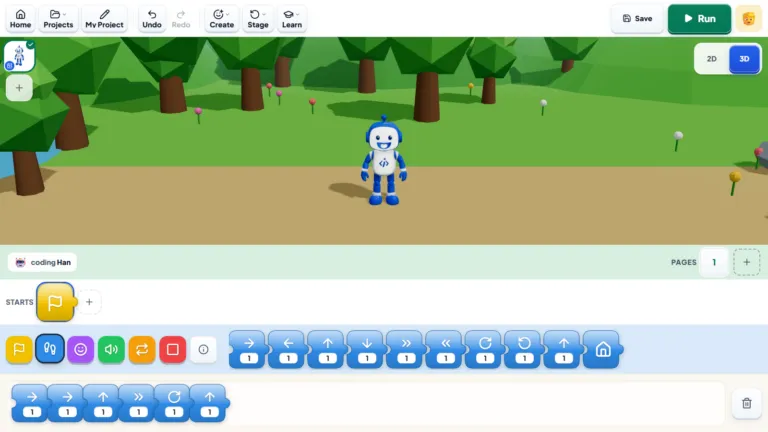
- Your child builds something small. The teacher guides them through an age-appropriate project: perhaps an animated story for a 5-year-old, a simple Scratch game for an 8-year-old, or a first Python program for a 12-year-old. Your child does the clicking and typing, while the teacher asks questions and helps when they get stuck.
- The teacher gauges their level. There’s no test. The teacher simply notices how your child thinks, how quickly new ideas land and what they do when something doesn’t work the first time.
- You get a recommendation. At the end, your child shows what they made, and the teacher suggests where to start and a learning path to follow. You can ask about schedules, teachers and prices, then take your time to decide.

Robotics and AI trials follow the same pattern. You don’t need a robot kit for a robotics trial; if your child continues, we ship the kit to your home in the UAE. And because a family can take one free trial in coding and one in robotics, a child who can’t choose between them can try both.
Can parents watch the trial class?
Yes. You can sit in on part of the trial, and we’d encourage it: it’s the easiest way to see how the teacher explains things and how your child responds. A few tips:
- Stay close at the start, especially with younger children, while they get used to the teacher and the screen.
- Hold back from helping. It’s tempting to point at the right block, but the teacher needs to see what your child can do on their own.
- Be there for the last few minutes, when the teacher tells you how it went and what they recommend.
How to prepare your child for a coding trial class
No coding experience is needed. A little preparation makes the trial calmer for everyone.
| Check | Why it matters |
|---|---|
| A laptop or desktop with a camera and microphone (a tablet for ages 5–6) | The teacher needs to see and hear your child, and most projects need a mouse or trackpad |
| Zoom installed and the link tested the day before | The class time goes on the project, not on setup |
| A quiet spot, with the charger plugged in | Fewer distractions and no battery scare halfway through |
| Headphones (optional) | Helpful in a busy home |
| Joining five minutes early | Time to settle in and say hello |
Talk it up, but keep it light. Tell your child they’re going to make a game or an animation with a teacher, not sit a test. If they have a favourite game, animal or sport, encourage them to mention it, so the teacher can build the project around it.
My child is shy. Will the trial still work?
That’s very common, and good teachers expect it. A shy child may give short answers at first or hesitate before clicking anything. The teacher will start with something easy so your child gets a quick win, and give them time to warm up.
“Some children need a little more encouragement at the start. Once they realise it’s okay to make mistakes, they become much more willing to try.”
— Roma O, iCodejr teacher
It also helps to sit nearby for the first few minutes. If your child is more comfortable in Arabic, ask for a trial in Arabic when you book.
“My daughter was a little hesitant at first, but her teacher really helped her settle in. Now she’s the one reminding me when it’s time for class!”
— Lauren B., parent of Chloe
Ready to see how your child gets on?
Try a free class with your own teacher, in coding, robotics or AI. It's live on Zoom, takes 45–50 minutes, and you'll get an honest recommendation on where to start.
What to look for during the trial
The trial is your chance to judge the class, not just your child. Good signs include:
- Your child does most of the work. They should be clicking, typing and making choices, not watching the teacher’s screen for 45 minutes.
- The teacher asks more than they tell. Questions like “What do you think will happen?” show they’re teaching your child to think.
- Mistakes are handled calmly. When something breaks, the teacher helps your child find the problem instead of fixing it for them.
- The project fits your child. It should feel a little challenging, but neither babyish nor overwhelming.
- Your child talks about it afterwards. If they want to show the rest of the family what they made, that’s a very good sign.
Watch out for a trial that’s mostly a sales pitch, a teacher who reads from slides, or pressure to pay before the call ends. A good provider will let you think it over.
Questions to ask after the trial
Before you sign up anywhere, ask:
- Will my child have the same teacher every week?
- How long is each class, and how often is it?
- What will they learn in the first few months, and how will I see their progress?
- Can they switch subjects, say from coding to robotics, without starting again?
- What does it cost, and are prices shown with or without VAT?
- What happens if it isn’t working out? Is there a refund policy?
Here’s how we answer them. At iCodejr, your child keeps the same teacher every week. Classes are live and one-to-one: 40 minutes for KG to Grade 1 and 50 minutes from age 7, in English or Arabic, with mornings, afternoons, evenings and weekends to choose from. Your child earns a certificate for every module, and parents get progress updates. Package credits work across all our programmes, so a child can move between coding, robotics and AI. If it still isn’t the right fit, our money-back guarantee means we’ll either sort it out with you or arrange a refund under our policy. To compare providers, our guide to choosing coding classes in Dubai has a full checklist.
What happens after the trial?
Nothing, unless you want it to. There’s no payment and no obligation. If you’d like to continue, you choose a credit package; paid classes start at AED 60 each plus VAT, depending on the package. Our guide to coding class prices explains how the packages work, and seasonal offers can bring the price down further.
Most children start with the course their teacher recommends: ScratchJr for ages 5–6, Scratch from about 7, and Python or Roblox from about 10. Children who love building start with our robotics classes, and older children who are curious about AI can join Generative AI. Our guide to the right age to start coding shows which course suits each age.
What if the trial didn’t go well? One lesson isn’t the final word. Perhaps the project didn’t click, your child was tired, or a different subject would suit them better.
“Not every child is going to love coding on day one, and that’s okay. Sometimes it takes finding the right project before things click.”
— Samir Aga, Co-founder and COO, iCodejr
If coding didn’t spark much interest, try a robotics trial, since children who like building with their hands often prefer it, or wait a few months and try again. Our guide to robotics or coding can help you choose.
Ask about this season's offer before you choose
We run offers several times a year, including in winter and summer, so you may pay less than the prices above. Message us and we'll tell you what's on right now.
Frequently asked questions
Is the coding trial class really free?
Yes. At iCodejr, the trial class costs nothing, and you don’t pay anything or share card details to book it. And you’re under no obligation to sign up afterwards.
How long is a coding trial class?
Ours lasts 45–50 minutes on Zoom. Other providers’ trials vary in length, so check when you book.
Does my child need to know any coding first?
No. The teacher starts wherever your child is, whether they’re a complete beginner or have already built games in Scratch.
What age can my child take a trial class?
We teach children aged 5 to 18, so any child in that range can take a trial. Younger children use a tablet and picture blocks; older ones work on a laptop or desktop.
What do we need for an online trial class?
A laptop or desktop with a camera, a microphone and a stable internet connection, plus Zoom. Children aged 5–6 use a tablet instead.
Can I watch my child’s trial class?
Yes, parents can sit in on part of it. Try to be there at the end, when the teacher explains how it went and what they recommend.
Can my child try robotics or AI instead of coding?
Yes. Trials can be in coding, robotics or AI, and a family can take one free trial in coding and one in robotics. You don’t need a robot kit for the trial.
Is the trial class in English or Arabic?
Either. Our classes are taught in English and Arabic, so just tell us which you’d prefer when you book.
Are trial classes held in person in Dubai?
Our trials and regular classes are live online, so your child can join from home anywhere in Dubai, the rest of the UAE or abroad. If you’d prefer a teacher at your home in Dubai, see our VIP programme.
What happens after the trial class?
The teacher recommends a starting course and a learning path. You can then choose a package, ask more questions, or simply leave it there.
Ready to see what your child can make? Choose a time for their free trial and we’ll confirm it on WhatsApp or email. Curious about learning online first? Read are online coding classes good for kids?