Your child has probably typed a question into an AI tool already and got an answer that was too long, too vague or just wrong. Most of the time, the problem isn’t the AI. It’s the question. Prompt engineering is simply the skill of asking AI clearly, and it turns out to be a great way to teach children to think before they ask and check what they’re told. This guide explains what it is, shows before-and-after examples for different ages, covers safety, and gives you four games to practise at home.
Quick answer: prompt engineering means writing clear instructions (prompts) for an AI tool and improving them until you get a useful answer. For children, it isn’t about coding. It’s about saying exactly what you want, including the task, the details, who it’s for, the tone and the format, and then checking whether the answer makes sense. Children can start practising from about 7 or 8 with an adult and kid-safe tools; many popular AI chatbots are only meant for users aged 13 and over.
What is prompt engineering?
Whatever you type into an AI tool is called a prompt: a question, a request or a set of instructions. Prompt engineering is the skill of writing prompts that are clear, specific and purposeful, so the AI can give a better response, and then adjusting them when it doesn’t.
Think about a teacher. If a child says “Can you help me?”, the teacher will ask, “Help with what?” If the child says “I’m stuck on fractions. Can you explain them using pizza slices?”, the teacher knows exactly what to do. AI works the same way, except it won’t ask “help with what?”. It just guesses.
Why it's worth learning
Prompt engineering won’t turn a 10-year-old into an AI engineer, and it doesn’t need to. What it builds is more useful than that:
- Thinking before asking. To write a good prompt, children have to work out what they actually want.
- Clear communication. The same skill helps with essays, presentations and explaining ideas to other people.
- Checking answers. AI tools sound confident even when they’re wrong. Children who learn to question an answer are much harder to fool, online and off.
- Using AI as a helper, not a shortcut. A child who asks “explain why my code doesn’t work” learns something; a child who asks “write my code” doesn’t.
The 5 parts of a good prompt
Here’s a simple checklist children can remember. Not every prompt needs all five, but the more you include, the better the answer:
- Task: what do you want? (“Write”, “explain”, “give me ideas for”…)
- Details: what is it about, and what must it include?
- Audience: who is it for? (“for a 9-year-old”, “for my class”)
- Tone or style: funny, serious, like a story, like a news report?
- Format: how long, and in what shape? (“in 5 bullet points”, “in under 100 words”)
Watch a prompt grow: “Write a story” becomes “Write a 300-word adventure story for a 10-year-old about two friends who find a hidden city under the sea. Make it funny and give it a surprise ending.” Same AI, much better story.
Prompt examples by age
| Age | Weak prompt | Better prompt | What it teaches |
|---|---|---|---|
| 7–9 (with a parent) | “Tell me about whales” | “Tell me 5 surprising facts about blue whales for a 7-year-old, in short sentences” | Adding an audience and a format |
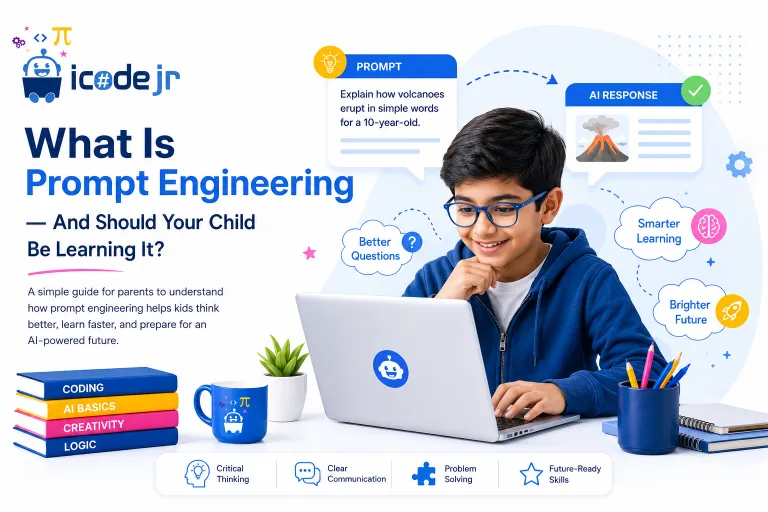
| 10–12 | “Explain volcanoes” | “Explain how volcanoes erupt in a funny tone, like a sports commentator, in under 150 words” | Tone changes how the answer sounds, not what it’s about |
| 10–12 | “Do my maths homework” | “I don’t understand how to add fractions with different denominators. Explain it with pizza slices and give me one practice question, without the answer” | Using AI to learn, not to copy |
| 13+ | “Fix my code” | “My Python loop never stops. Explain what might cause that and give me a hint, but don’t rewrite my code” | Asking for hints keeps the learning theirs |
| 13+ | “Make me a study plan” | “Make a 2-week study plan for my science test on the 20th. I have 30 minutes on weekdays and 1 hour on Saturday. Put it in a table” | Giving the details the AI can’t know |
That second example comes up in school quizzes: if a student asks an AI to explain volcanoes in a funny tone instead of a formal one, the style of the answer changes (it becomes more entertaining), but the topic stays the same.

Is AI safe for kids?
It can be, with the right tools and a few rules:
- Check the age limit. Many popular AI chatbots set a minimum age of 13, with a parent’s permission for under-18s. Check each tool’s terms before your child signs up.
- Use kid-safe tools for younger children. In our classes, younger children use kid-safe AI tools that run in a protected sandbox.
- Keep personal information private: no full names, school names, home addresses or photos in prompts.
- Treat answers as a first draft. AI can make things up. Teach your child to check important facts in a second source.
- Follow school rules on homework. Many schools allow AI for ideas and explanations, but not for writing the work.
Our guide to AI for kids covers safety in more detail.
4 prompt games to play at home
- Make it better. Write a deliberately vague prompt (“tell me about space”), then take turns adding one detail at a time and compare the answers.
- Three tones. Ask for the same explanation three ways: like a teacher, like a pirate and like a news reporter. Talk about what changed and what stayed the same.
- Spot the mistake. Ask about something your child knows well, such as their favourite football team or game. Can they find anything the AI got wrong?
- Hint, don’t tell. When your child is stuck on homework, they must write a prompt that asks for a hint or an explanation, never the answer.
“I like giving students room to experiment. Sometimes their version of the project turns out to be more interesting than the one I had planned.”
— Ria K, iCodejr teacher
Does prompt engineering replace coding?
No, they do different jobs. If AI were a car, coding would be understanding how the engine works, and prompting would be driving it well. Coding teaches children how technology works underneath; prompting teaches them how to work with it. Children who learn both understand AI far better than those who only use it, and they’re less likely to trust it blindly. If your child is curious about how AI actually learns, our guide to AI and machine learning for children is a good next step.
Want your child to learn AI the right way?
Try a free one-to-one AI lesson with a real teacher, online. Your child builds a small project with a teacher, using kid-safe AI tools, and you can watch part of it.
How we teach prompting at iCodejr
We teach prompting as part of building things with AI, not as a separate trick:
- Ages 10–16: our Generative AI course is 20 live one-to-one sessions with more than 12 projects, such as an AI cartoon creator, an AI meme generator, an AI weather bot and an AI music project that also looks at the ethics of AI.
- Younger children: AI projects in Scratch and our kid-safe AI sandbox, where they see how a computer learns from examples.
- Teens: our AI Developer track goes further, into Python, machine learning, computer vision and AI agents.
Classes are live, online and one-to-one, in English or Arabic, and cost from AED 60 a class plus VAT after a free first lesson. If you’d like one-to-one help at home, see our guide to coding and AI tutors at home. Older students who want a challenge can enter AI competitions in the UAE.
Ask about this season's offer before you choose
We run offers several times a year, including in winter and summer, so you may pay less than the prices above. Message us and we'll tell you what's on right now.
Frequently asked questions
What is prompt engineering for kids?
It’s learning to write clear instructions for AI tools, saying exactly what you want and checking the answer. For children, it’s mainly a thinking and communication skill.
What age can kids learn prompt engineering?
From about 7 or 8 with an adult and kid-safe tools. Many popular AI chatbots are for users aged 13 and over, so younger children should practise with a parent or in a class.
Do kids need to know coding to learn prompt engineering?
No. Prompting uses everyday language. Coding helps children understand how AI works, so the two go well together, but neither is needed to start the other.
What makes a good prompt?
A clear task, the important details, who it’s for, the tone you want and the format of the answer. Then read the answer and improve the prompt if needed.
What happens if you ask an AI to explain something in a funny tone?
The style of the answer changes and becomes more entertaining, but the topic stays the same. Tone is one of the easiest ways for children to see how prompts shape answers.
Is it safe for children to use AI?
It can be, with age-appropriate tools, an adult nearby for younger children, no personal details shared, and a habit of checking important facts.
Is using AI for homework cheating?
That comes down to how your child uses it, and what their school allows. Asking for an explanation or a hint helps learning; asking AI to write the work usually isn’t allowed.
Will prompt engineering replace coding?
No. Prompting is how you work with AI; coding is how AI and other software are built. Children benefit from learning both.
Can I teach prompt engineering at home?
Yes. Try the games above, such as “make it better” and “three tones”, in short sessions with your child, using a tool suited to their age.
Do you teach prompt engineering?
Yes, as part of our Generative AI course for ages 10–16 and our AI projects for younger children. The first lesson is free.
Ready to start? Book a free first lesson, or see our Generative AI course.