Your six-year-old can’t type quickly yet, but they can snap colourful puzzle pieces together and watch a cartoon cat dance across the screen. That is block coding: real programming, with the typing taken out. This guide explains what block coding is, shows a simple example, lists the best free block coding apps for each age, and helps you decide when your child is ready to move on to typed code.
Quick answer: block coding (also called block-based coding or block programming) is a way of writing computer programs by dragging and snapping together visual blocks, each one an instruction such as “move 10 steps” or “repeat 4 times”. The blocks only fit together in ways that make sense, so children can’t make typing or spelling mistakes. They still learn the same ideas as in typed code: sequences, loops, conditions, events and variables. Most children can start with picture blocks at about 5 and move to typed languages like Python from about 10.
What is block coding?
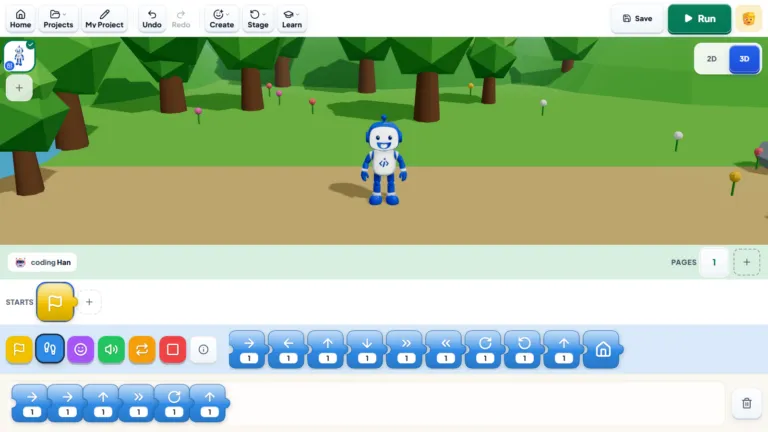
In block coding, each instruction is a coloured block with words or pictures on it. Children drag blocks from a menu and stack them like jigsaw pieces to build a program. The shape of each block shows where it can go: a “repeat” block wraps around other blocks, and a “when green flag clicked” block sits on top of a stack to start it.
Because the blocks are ready-made, children spend their time on the thinking part of programming (what should happen, in what order, and when) instead of on spelling and punctuation. This is why block coding is used in schools around the world as the first step in computer science.
“Some children need a little more encouragement at the start. Once they realise it’s okay to make mistakes, they become much more willing to try.”
— Roma O, iCodejr teacher
How block coding works: a simple example
Here is a tiny program a seven-year-old might build in their first Scratch lesson, to make a character bounce around the screen:
| Block | What it tells the computer |
|---|---|
| when green flag clicked | Start this program when the green flag is pressed |
| forever | Keep doing the blocks inside, again and again |
| move 10 steps | Move the character a little to the right |
| if on edge, bounce | If the character reaches the edge of the screen, turn it round |
| next costume | Change the picture slightly, so the character looks like it’s walking |
Five blocks, and the child has used an event (the green flag), a loop (forever) and a condition (if on edge). These are exactly the ideas they’ll meet later in Python, just written as words instead of blocks.
Why block coding suits beginners
- No typing errors. A missing bracket can stop a typed program. Blocks can’t be misspelt.
- You see results at once. Click the green flag and the character moves, so children connect each block to what happens.
- Everything is visible. All the available instructions sit in a menu, so children explore instead of memorising.
- Mistakes are cheap. Pulling a block out and trying again takes a second, which encourages experimenting.
- It works before reading is fluent. Picture-block apps like ScratchJr need almost no reading at all.
Block coding isn’t the same as playing with building-block toys, though the idea of snapping pieces together is similar. And it isn’t “fake” coding: the logic is the same, which is why children who learn blocks well usually find their first typed language much easier.
Block coding vs text coding
| Block coding | Text coding (e.g. Python) | |
|---|---|---|
| How you write code | Drag and snap visual blocks | Type instructions as text |
| Typical starting age | About 5–7 | About 10+ |
| Spelling and punctuation | Not needed | Every character matters |
| What children learn | Sequences, loops, conditions, events, variables | The same ideas, plus more advanced ones |
| What they can build | Games, animations, stories, simple AI and robots | Bigger apps, websites, data projects, advanced AI |
| Limits | Big projects get hard to manage | Fewer limits, steeper start |
Our guide to what coding is for kids explains these ideas in more detail.
The best block coding apps for kids, by age
All of these are free.
| Age | App | Device | Good for |
|---|---|---|---|
| 5–7 | ScratchJr | Tablet | First picture-block programs: animated stories and simple games, with almost no reading |
| 6–12 | Scratch | Computer (browser) | Games, animations and quizzes; the most popular block coding tool in schools |
| 6–12 | Code.org | Computer or tablet | Short guided puzzles and courses, good for practice between lessons |
| 8–14 | Minecraft Education | Computer | Coding inside Minecraft worlds with blocks, with a path towards typed code |
| 8+ | Microsoft MakeCode | Computer | Programming small electronics like the micro:bit with blocks: lights, sensors and simple robots |
| 9+ | Blockly Games | Browser | Puzzle-style challenges that gradually show the typed code behind the blocks |
If you’re not sure which fits your child, our guide to what age kids should start coding goes through each age.
What kids can make with block coding
Block coding isn’t only for simple puzzles. Here are real projects from our own block coding courses:
- Ages 5–7 (ScratchJr): an animated greeting card with moving characters, an underwater scene with swimming fish, and a maze game.
- Ages 6–11 (Scratch Level 1): a flying-cat game controlled with the arrow keys, two-player Pong, and “Chameleon AI”, which uses AI to detect colours and change a character’s look.
- Ages 8–12 (Scratch Level 2): bigger games with levels, scores and smarter characters.
- Ages 8–14 (Minecraft Education): builds like a roller coaster with loops and drops, coded rather than built block by block.
Block coding also works for robotics (programming a micro:bit robot to react to light or sound) and for AI (training a simple model to recognise pictures, then using it in a game). Our guides to Scratch games for kids and AI for kids have more ideas.
When should kids move from blocks to typed code?
There’s no fixed age, but these signs usually mean a child is ready:
- Their projects are getting big, with so many blocks that they scroll around looking for things.
- They ask how “real” apps or games are made, or want to do something blocks can’t.
- They type comfortably, usually from about 9 or 10.
- They understand loops, conditions and variables without needing help.
Most children move on to Python first, because its words read almost like plain English. Our Python for kids guide explains how that step works. Children who love games often try typed code in Roblox next, from about 10.
There’s no rush, though. Plenty of children do impressive work in Scratch for years, and the thinking skills carry over whenever they switch.
How to start block coding at home
- Pick the app for their age: ScratchJr on a tablet for 5–7, Scratch on a computer from about 7.
- Start with something they love: a story about their pet, or a game with their favourite animal.
- Keep sessions short: 20 to 30 minutes is plenty at first.
- Let them break things: ask “what do you think will happen if you change that number?” rather than fixing it for them.
- Show it off: having them demonstrate their game to the family builds confidence.
You don’t need any coding experience to help. Our guide to coding at home has more tips.
Want to see how your child gets on with block coding?
Try a free one-to-one lesson with an iCodejr teacher, live online. Your child builds a small game or animation with blocks, and you're welcome to watch part of it. There's nothing to pay.
Block coding classes at iCodejr
Our block coding courses are live, online and one-to-one, in English or Arabic, so the teacher works at your child’s pace:
- ScratchJr for ages 5–7, on a tablet
- Scratch Level 1 and Level 2 for ages 6–12
- Minecraft Education for ages 8–14
- Robotics for younger children, coding a micro:bit kit we ship to UAE homes
When your child is ready, the same teacher can move them on to Python or Roblox. After a free first lesson, classes cost from AED 60 a class plus VAT, and our prices guide explains the packages.
Ask about this season's offer before you choose
We run offers several times a year, including in winter and summer, so you may pay less than the prices above. Message us and we'll tell you what's on right now.
Frequently asked questions
What is block coding?
A way of writing computer programs by snapping together visual blocks, each one an instruction. It teaches the same ideas as typed code without the typing.
Is block coding real coding?
Yes. Children use the same ideas as in typed languages, such as loops, conditions, events and variables. Only the way they write the instructions is different.
What age can kids start block coding?
From about 5, with picture-block apps like ScratchJr on a tablet. From about 7, most children can use Scratch on a computer.
Is Scratch block coding?
Yes. Scratch is the best-known block coding language, made by MIT and free to use. ScratchJr is its simpler version for ages 5–7.
What is the best block coding app for kids?
ScratchJr for ages 5–7 and Scratch from about 7. Code.org, Minecraft Education, MakeCode and Blockly Games are good extras, and all are free.
Is block coding free?
The main tools are free: ScratchJr, Scratch, Code.org, MakeCode and Blockly Games. Minecraft Education needs a licence, which many schools provide.
When should my child switch from block coding to Python?
Usually around 9 to 11, when their projects get big, they type comfortably and they understand loops and conditions without help.
Can kids learn AI or robotics with block coding?
Yes. Scratch has tools for simple AI projects, and MakeCode lets children program micro:bit robots and sensors with blocks.
Is block coding the same as building blocks or block games?
No. Building-block toys are physical; block coding uses on-screen blocks to write programs. The snapping idea is similar, which makes it feel familiar.
Can my child try a block coding lesson first?
Yes. Your child’s first lesson is free, one-to-one with a teacher, and you can sit in for part of it.
Ready to give block coding a try? Book a free first lesson, or see our ScratchJr and Scratch courses.