Your child probably uses a dozen apps a week: games, video calls with family abroad, the school’s homework portal. Sooner or later, many children ask: “Could I make my own?” They can, and usually at a younger age than parents imagine. This guide covers the best free app builders by age, what children build, a first app to make at home, and app classes in Dubai.
Quick answer: app development for kids means designing and building simple apps for phones, tablets or the web, usually with free block-based app builders such as MIT App Inventor, Code.org App Lab or Thunkable. From about 8, most children can build a first working app, like a quiz or a talking button, in an hour or two with a little help. Typed code (JavaScript or Python) usually comes from about 10 or 11. Starting is free.
What is app development for kids?
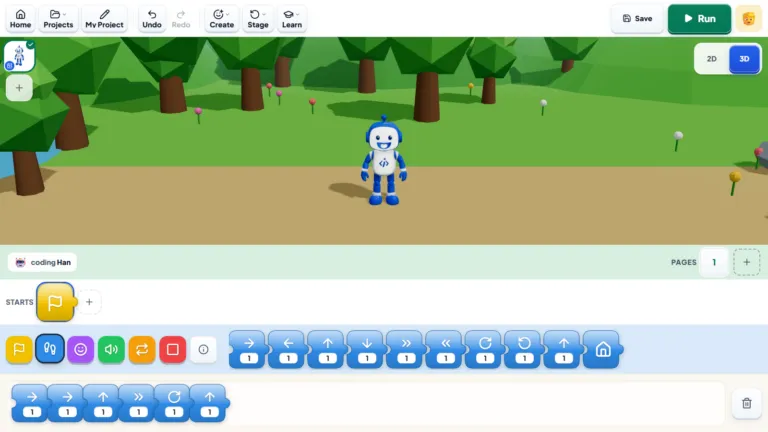
Every app has three parts: the screen you see, the controls you tap, and the code that decides what happens when you tap them. Children use app builders where they drag buttons onto a phone-shaped screen, then snap together blocks such as “when the button is clicked, say hello”.
The logic is the same as in Scratch, but the result runs on a real phone. A child who can hand their grandmother a phone and say “I made this” usually wants to make the next one straight away. Most won’t become app developers, and that’s fine: they still learn to break problems into steps and fix what doesn’t work.
Which app builder suits which age?
Most mobile app development for kids starts with blocks, not typing:
| Age | Tool | How it works | Good to know |
|---|---|---|---|
| 5–7 | ScratchJr or Bloqi | Picture blocks on a tablet or in a browser | Not app builders, but they teach the same ideas |
| 8+ | Code.org App Lab | Blocks that can switch to typed JavaScript | Apps run in a browser and can be shared with a link |
| 9+ | MIT App Inventor | Design the screen, then add blocks | Free, made by MIT; works best with Android phones |
| 9+ | Thunkable | Design the screen, then add blocks | Apps for iPhone and Android; free account to start, some features paid |
| 10+ | JavaScript or Python | Typed code | Web and desktop apps |
Bloqi is our own free block-coding space at bloqi.ai, where younger children code, create and play in the browser. The ages are a guide, not a rule; children new to coding find apps easier after a few weeks of block coding. For ages more broadly, read what age kids should start coding.
What can kids build?
Start small. A first app might be a talking button, a three-question quiz or an animal sound board. Then the ideas grow:
- Apps with live data: a weather app or a language translator.
- Apps that use the phone: a drawing app, or one that uses the camera or sensors.
- Apps with AI: a simple chatbot, or an app that recognises objects through the camera.
- Games: a catching-stars game or a quiz with a score. For more on games, see our guide to game development classes for kids.
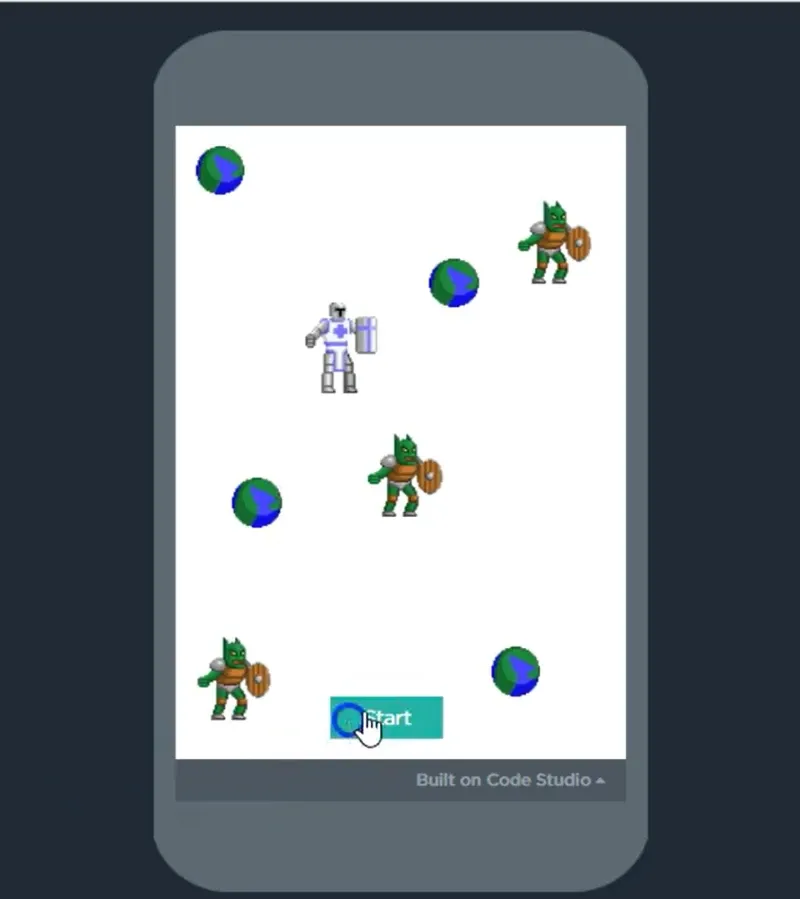
From our classes: Mishka, 9, built a monster game in App Lab: a knight, three orc monsters and a Start button, all on a phone-shaped screen that can be shared with a link.
A small app that works beats a big one that doesn’t, and children know the difference.
“I’d much rather see a child proudly showing off a simple game they built themselves than a complicated project they barely understand.”
— Hannan Moti, Founder and CEO, iCodejr
How to build a first app at home
You can do this in an afternoon, for free. Our YouTube playlist Thunkable Tutorials: No-Code App Development shows each step, from creating a free account to complete apps such as a weather app, a translator, a shopping app and a catching-stars game.
- Choose the tool. Thunkable works with iPhones and Android phones; App Inventor suits Android families. Both need a laptop or desktop.
- Set up the account together. Many tools expect an adult’s involvement for under-13s, so use a parent’s account.
- Pick a tiny idea: one screen and one or two buttons, such as a joke of the day or a football quiz.
- Design the screen. Let your child choose the colours and pictures; it’s the part they’ll care about most.
- Add the blocks, for example “when the button is clicked, show the next joke”.
- Test it on a real phone with the tool’s free companion app.
- Show someone, then add one thing: a score, a sound or a second screen.
When something breaks, ask before you fix: “What did you expect to happen, and what happened instead?” More tips are in our guide to learning coding at home.
Want your child to build an app with a real teacher?
Try a free one-to-one lesson with a teacher, online. Your child begins a small app or game pitched at their level, and you're welcome to watch part of it.
How long does it take to learn app development?
A first simple app takes an hour or two. Getting confident with an app builder takes about 24 classes, the length of each app module on our age paths (roughly three to four months at two a week). Apps in typed code take longer: the basics of Python or web development usually take 24 to 48 classes.
Publishing an app: what parents should know
- Most children don’t need the app stores. App Lab apps can be shared with a link and App Inventor apps can be installed straight onto an Android phone.
- The stores have rules. Publishing on the App Store or Google Play needs a paid developer account, and both stores generally expect an adult account holder, so a parent would need to set it up.
- Keep personal details out: no full names, school names, photos or locations in apps other people can see.
- Check each tool’s age rules, especially for AI apps. In our classes, younger children use kid-safe AI tools in a protected sandbox; our AI for kids guide covers AI safety.
Choosing app development classes in Dubai
Free tools are a great start. A teacher earns their place when your child hits the same wall again and again, or outgrows blocks. When you compare app development classes, ask:
- Does my child build something in every class? Watching a teacher build isn’t the same.
- Is the tool right for their age? Use the table above.
- Will they test apps on a real phone? It’s the most motivating part.
- How much of the teacher’s time will they get? One-to-one, the teacher sees their screen straight away.
- Where does my child go after their first app? A good course leads from blocks to typed code.
Live or recorded? Recorded videos, including our free Thunkable tutorials, suit a first app and older, self-motivated children, but a video can’t see your child’s screen when an app doesn’t work. For apps, we suggest the free videos to start, then our live App Lab and App Inventor programmes.
Online saves the school run. Live online classes mean no drive across Dubai after school, with class times from morning to evening, including weekends. Friday afternoons suit many families, since Dubai private schools finish by noon.
How we teach app development at iCodejr
Our app development programmes use Code.org App Lab and MIT App Inventor, and they’re built into our age paths, so app building grows with your child:
- Ages 7–8: the ages 7–8 coding and AI path includes an App Lab module (24 sessions) with projects such as a weather dashboard, then MIT App Inventor with AI: a mobile quiz app and an AI chatbot.
- Ages 9–10: the ages 9–10 coding and AI path has an MIT App Inventor module (24 sessions), with projects such as a drawing app and an AI-powered budget app.
- Ages 11–14: the ages 11–14 coding and AI path moves to typed code: Python apps such as a smart calculator and a text editor, then web apps in JavaScript and React. Our web development course (ages 10–18) goes further; see our guide to web development for kids.
Classes are live, online and one-to-one, in English or Arabic: 50 minutes for ages 7 and over, the same teacher every week, and a certificate for every module. Class credits work across all our programmes, so a child can move from apps to Python, AI or robotics.
“Seeing your child genuinely excited about learning something new is such a nice feeling. We’re really happy with the experience so far.”
— Kavita D., parent of Myra
If you’d rather have a teacher come to you, our VIP At-Home programme is available in Dubai only.
Prefer lessons at home in Dubai?
With iCodejr VIP, a senior instructor teaches your child app building, coding, AI or robotics in your home, from AED 250 an hour. Parents meet the teacher every month, and only 100 students are accepted each year.
For online classes, the first lesson is free. After that, packages start from AED 60 a class plus VAT (our prices guide explains how they work), and we run seasonal offers, so ask before you choose.
Ask about this season's offer before you choose
We run offers several times a year, including in winter and summer, so you may pay less than the prices above. Message us and we'll tell you what's on right now.
Frequently asked questions
What is app development for kids?
It’s designing and building simple apps for phones, tablets or the web, usually with block-based app builders. Children design the screen, then add code that decides what each button does.
At what age can kids start app development?
From about 8, with block-based app builders such as App Lab, App Inventor or Thunkable. Children aged 5 to 7 can learn the same ideas with ScratchJr, and typed code usually starts at about 10 or 11.
Can kids make an app for free?
Yes. MIT App Inventor and Code.org App Lab are free, and Thunkable has a free account to start. Our Thunkable tutorials on YouTube are free too.
Thunkable or MIT App Inventor: which is better for kids?
Both are good first app builders that use blocks. App Inventor is free and works best with Android phones; Thunkable makes apps for iPhone and Android, with some features on paid plans.
Is Thunkable safe for kids?
Thunkable is mainly a tool for building apps. Check its age rules before your child signs up, use a parent’s account for younger children, and keep personal details out of any app they share.
Can my child put their app on the App Store or Google Play?
It’s possible, but both stores need a paid developer account and generally expect the account holder to be an adult. Most children share their apps with a link or install them on the family’s phones instead.
Can toddlers learn mobile app development?
Not really. Toddlers learn more from play, stories and building toys. From about 5, ScratchJr on a tablet teaches the ideas behind apps, and real app builders suit children from about 8.
Do you offer app development classes for kids in Dubai?
Yes. Our live App Lab and MIT App Inventor programmes are taught online and one-to-one as part of our age paths, and the first lesson is free. In Dubai, VIP At-Home can also bring a teacher to your home: apply here.
Ready to build a first app? Book a free first lesson, or start at home with our Thunkable app tutorials.